Contents · Previous: Extra knowledge · Next: Pipeline
Workspaces
Workspace is the control page for one collection. The Dashboard tells you how big the collection is. This page tells you which models read it, how files are split, and which buttons would rebuild or delete it.
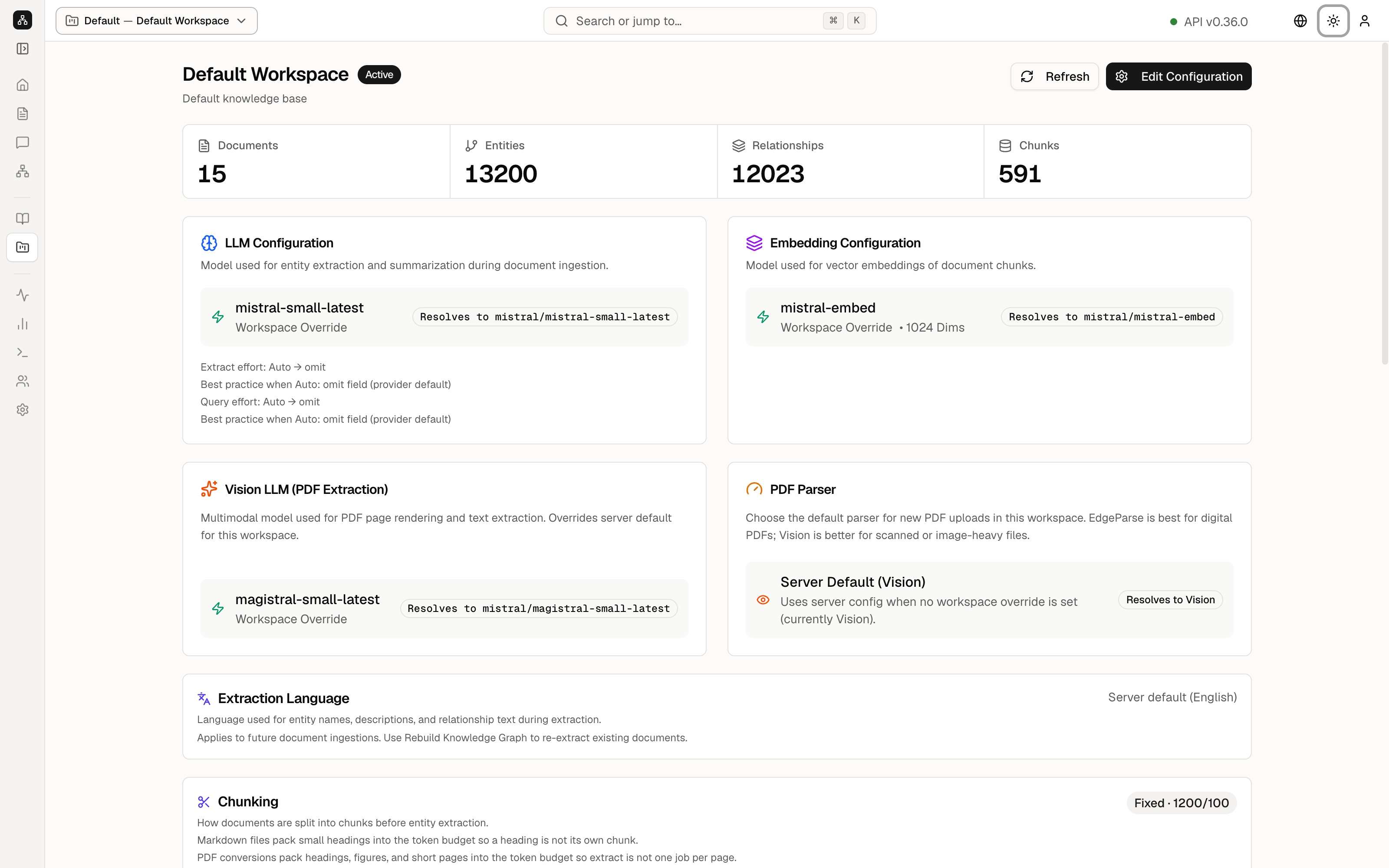
The picture is the whole page, top to bottom. Read it in that order. The header chip still says which collection you are editing. Here it is Default Workspace.
The title row
Default Workspace has an Active pill and the subtitle Default knowledge base. Refresh reloads the page. Edit Configuration opens the editor for the name and the model choices.
Four cards repeat the Dashboard counts: Documents 15, Entities 13200, Relationships 12023, Chunks 591.
Which model does what
Three cards name the models for this collection. A Workspace Override badge means this collection uses its own choice, not only the server default.
- LLM Configuration is the model that lists entities and writes summaries while a file is read. Here it is
mistral-small-latest, which resolves tomistral/mistral-small-latest. Extract effort and Query effort are both Auto → omit, which means “leave the model’s own effort setting alone”. - Embedding Configuration is the model that turns chunks into vectors, long lists of numbers that let similar text be found. Here it is
mistral-embed, 1024 dimensions, resolving tomistral/mistral-embed. - Vision LLM (PDF Extraction) is the model that looks at PDF pages. Here it is
magistral-small-latest.
PDF Parser chooses how new PDFs are read. Server Default (Vision) means “use whatever the server is set to”, and the server is currently Vision. The card says EdgeParse is the fast path for ordinary digital PDFs, and Vision is the better path for scans and pages that are mostly pictures.
How files are cut up
These cards apply to files you add from now on. Files already in the library stay as they are until you rebuild.
- Extraction Language is Server default (English). Entity names and descriptions are written in that language.
- Chunking is Fixed · 1200/100. Files are cut into pieces of about 1200 tokens, with 100 tokens of overlap so a sentence on the boundary is not lost. The card also says markdown headings and short PDF pages are packed together so a heading is not its own lonely chunk.
- Extract budget is Custom · 40/100. One model reply may list at most 40 entities and 100 rows in total. This is a cap on a single reply, not a cap on the whole map.
Extraction mode
Extraction mode is LLM, marked Active, on Server default (LLM). A chat model reads each chunk and lists entities and relations.
Under that is Decision engine. It is a second, optional reader that answers yes-or-no questions with a small local model. On this demo it is set to Ollama at host.docker.internal:11434 and the model tev1:0.8b. The yellow line Cannot reach the decision backend means that small model is not running on the demo server. Check again retries. The chat-model path above it is the one actually reading documents. Advanced hides extra knobs. Reset and Save apply to this card. Leave them unless you are configuring your own server.
What kinds of things are allowed
Entity Types lists the kinds of dots the reader may create. This workspace uses the server defaults: PERSON, ORGANIZATION, LOCATION, EVENT, CONCEPT, TECHNOLOGY, PRODUCT, DATE, DOCUMENT. Strict limit: on means a thing that fits none of those becomes OTHER.
Relation Types lists the kinds of lines: RELATED_TO, PART_OF, LOCATED_IN, WORKS_AT, CREATED_BY. Under them, Typed edges shows which kinds of dots may use which line, for example PERSON — WORKS_AT → ORGANIZATION. +2 more expands the rest.
Rebuild and delete
Workspace Actions is the dangerous half of the page. Read it before you click.
- Rebuild Embeddings recomputes vectors. The card shows the current model
mistral/mistral-embedand dimension 1024. Use it after you change the embedding model. It does not delete the entities. - Rebuild Knowledge Graph clears the entities and relationships and reads the files again. Use it after you change the chat model, the entity types, or the chunk size. It deletes the current map for this workspace. Documents stay.
- The id line shows Workspace ID, the short name default, and Created / Updated 9/19/2026.
- The green line Workspace ready for queries and document ingestion means you can ask questions and add files.
- Danger Zone and Delete this workspace remove the collection, including documents, entities, relationships, and embeddings. That cannot be undone. On the demo, do not press it.
Keep going
Next: Pipeline. The day-to-day switches for pictures and answers, including theme and saved connections, are on Settings.