Contents · Previous: Dashboard · Next: One document
Documents
Documents is the library. You add files here, and you see whether each one has been turned into map items.
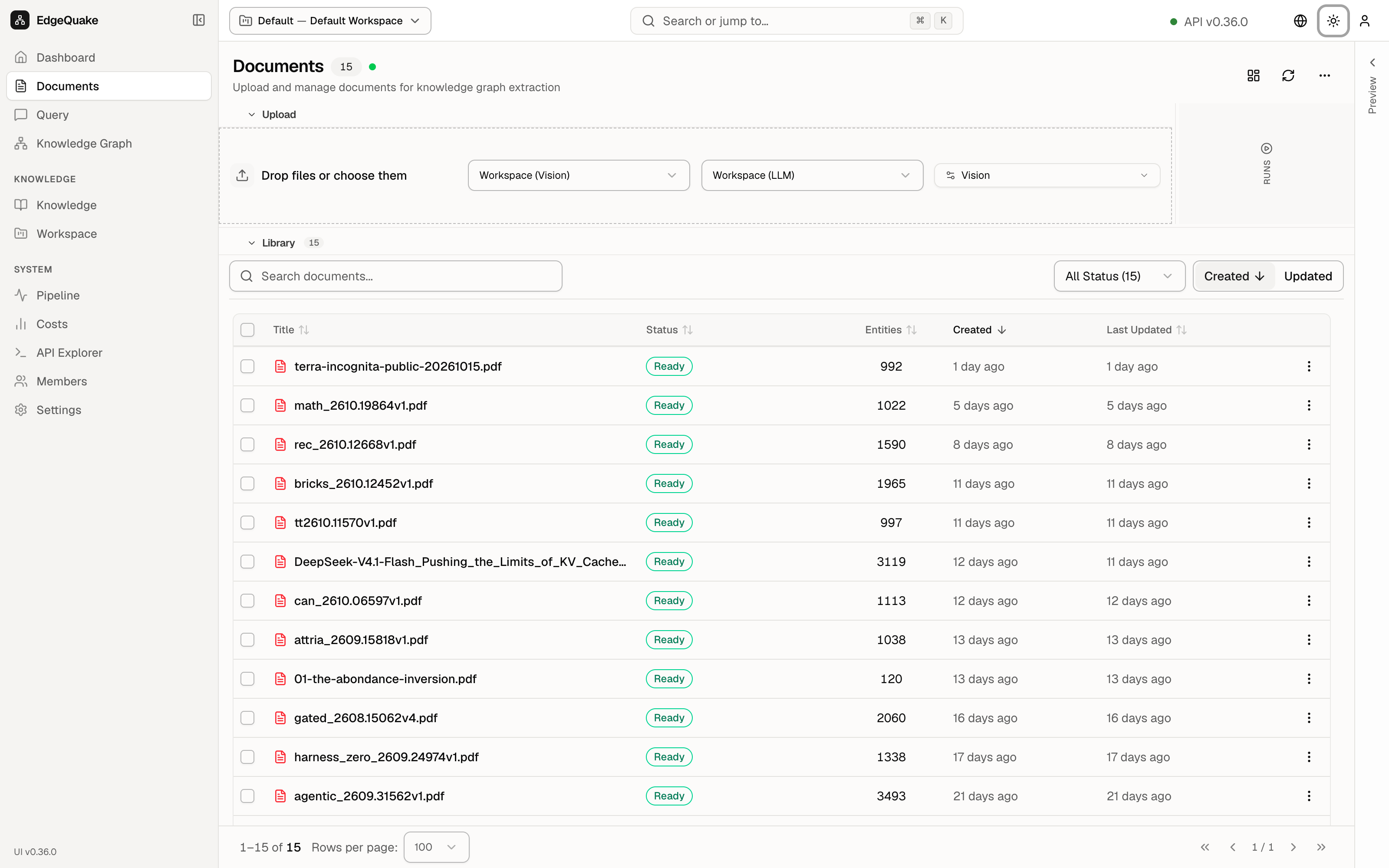
The heading is Documents with a count, 12, and a green dot. The subtitle is Upload and manage documents for knowledge graph extraction.
Adding a file
The dashed box is the drop zone. It says Drop files or choose them. You can drag a file onto it, or click and pick one from your computer. The note under the box says files can be up to 50MB, and Word and Excel files are not accepted. PDF and text are the usual choices.
Three menus sit in that same box:
- Workspace (Vision) chooses the model that looks at page pictures.
- Workspace (LLM) chooses the model that reads the text and lists entities.
- Vision chooses how a PDF is read. Vision means a model looks at each page as a picture, which is the right choice for scans, tables, and figures.
Upload in the toolbar opens or closes this box. Refresh reloads the list. Layout changes how the list is drawn. The ⋯ menu holds less common actions.
On a shared demo, do not upload a private file. The drop zone is there so you can see how adding a file works.
The library
Library and the count 12 sit above the table. Search documents… filters by name. All Status (12) filters by state. Created and Updated change the sort.
The columns are:
- A checkbox, for acting on several rows at once.
- Title, the file name.
- Status. Ready in green means the file was read and the map was updated. The fuller label is Completed · Ready.
- Entities, how many things were found in that file. The bricks paper shows 1965.
- Created and Last Updated, as a relative time such as 2 days ago.
- A ⋯ menu on the row for actions on that one file.
The footer says 1–12 of 12, Rows per page (here 100), and page 1 / 1.
Click a row once and a preview opens on the right. Double-click a row and you get the full page for that file, which is the next chapter.
Keep going
Next: One document. When many files are still being read, the place to watch is Pipeline.